We using RegNow.com certified payments processor for payments. You can verify it certificates here:
You don’t give your credit card information to us, you giving it to certified intermediate party. In any case you can pay through PayPall or any other way provided by RegNow. Go to the RegNow order page by clicking Get registration key and select payment way. You receive registration code immediately after order.
How to order Guitar Tuner. Step by step instruction:
If you don’t have trial version, download and install Guitar Tuner.
Click on Get registration key, it will brings you on regnow.com certified payments processor page.
Click Order Now button of RegNow billing page.
Select payment way. If you have a trouble with some option you can try another option. In case of troubles you can contact payments processors Customer Support. Also you can place order or ask order related questions by phone:
Toll Free Number in the US 1-877-353-7297
Internationally phone 1-(952) 646-5331
You may need product ID 16230-8 for Xitona Guitar-Tuner
You will receive further instructions after payment method selection. Feel free to chouse some one, even if you don’t understand how it’s going. You will be able to cancel order after method selection, and select another one.
Immediately after ordering, you will see registration code in your Internet browser.
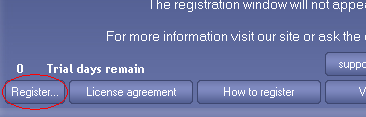
Startup Guitar Tuner and press “register” button on the startup banner
or
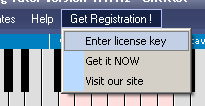
“enter license key” in the program menu.
Insert registration code into window. After all press register button. In case of successful registration startup banner will not be shown anymore.
If you need any explaining or if you have some suggestions, please feel free to contact us support@xitona.com